MCP, the USB-C port for AI applications
June 27, 2025
My brief explanation of what MCP is and why it's exciting. This article is intended for people who work in IT and want to keep up to date with advancements in LLMs.
mcpllmintegration
🤔 What is MCP and why is it exciting?
MCP stands for Model Context Protocol and it's a standardised way to connect LLMs to different data sources and tools. Now you can power-up your AI assistant (e.g. Claude Desktop) to integrate with any number of services to fetch real-time data (e.g. get the local weather), perform a task (e.g. create a calendar event), or talk to other LLMs.
In their own words, Model Context Protocol is described as "the USB-C port for AI applications":
Think of MCP like a USB-C port for AI applications. Just as USB-C provides a standardized way to connect your devices to various peripherals and accessories, MCP provides a standardized way to connect AI models to different data sources and tools.
LLMs were already capable of integrating with external services through bespoke integrations between LLM vendors and services. But standardisation of this opens the doors for developers and companies to build their own LLM integrations. This is why we have seen the proliferation of awesome MCP servers in the last few months.
🕍 MCP Architecture
Components of MCP:
- Hosts - LLM-based AI tools like Claude Desktop.
- Clients - run inside hosts and connect to servers in a 1-to-1 relationship.
- Servers - lightweight programs that wrap capabilities offered by services.
- Services - existing tools or data sources e.g. local file system, or a traffic service on the internet.
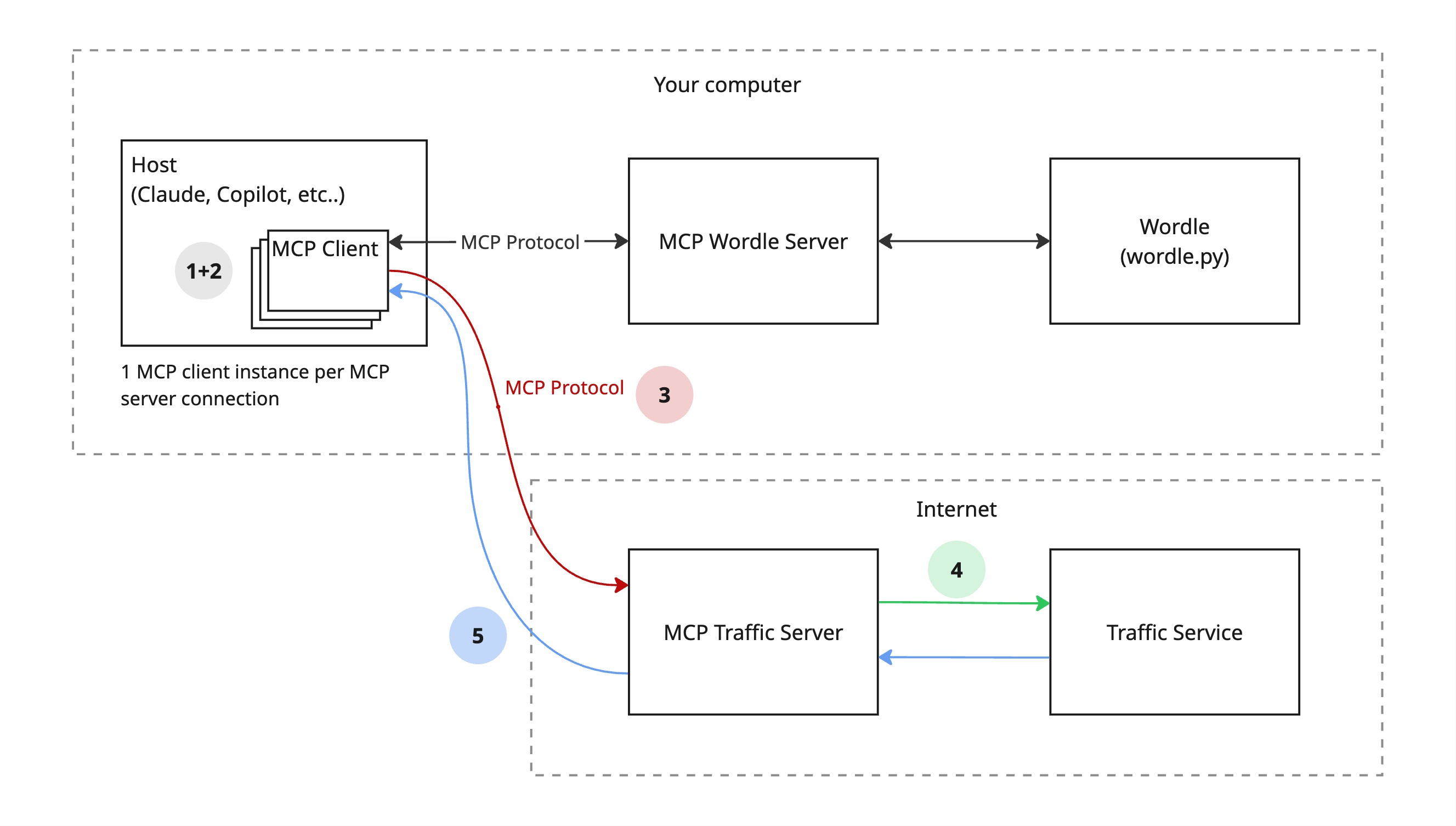
Here's an example of how this works in practice: Prerequisite: You've setup a connection to the MCP traffic server
- You prompt your AI tool with an intention "get the current traffic conditions on the M1 freeway".
- The tool may ask whether your would like to use the traffic service.
- The tool communicates via it's client to the traffic server over MCP calling
get_current_traffic(). - The traffic server communicates to the traffic service, typically REST over HTTP.
- The response is provided as context to your AI tool which you can then interrogate.
You might be asking "why can't the host talk to the services directly"? They could, but this would require a bespoke integration between the LLM vendor and Traffic service, resulting in a lack of interoperability and significant maintenance overhead.
Additionally, direct integration is complex and difficult to reuse because of the high variance in services on the internet (in terms of request/response formats, error handling and authentication). MCP solves this by acting as a simplified layer between an LLM and a service which allows the LLM to communicate in a language it understands.
You can checkout a working example of an MCP server I built for Wordle, mcp-wordle, to see how this fits in with the diagram above. In my case, the Wordle game runs inside the MCP server but this could just as easily be a seperate service hosted within your computer or on the internet.
If you are interested in building your own MCP server, I found it was easy to get started using the official Python SDK for MCP.
Thanks for reading 🐢